oobeSystem pass được khởi chạy sau khi máy tính khởi động lại lần thứ hai trong quá trình cài đặt. Giai đoạn này sẽ cấu hình các thiết lập được áp dụng trong lần khởi động đầu tiên của người dùng cuối hay còn được gọi là Out-Of-Box Experience (OOBE). oobeSystem được xử lý trước khi người dùng đăng nhập vào Windows lần đầu tiên.
Out-of-Box-Experience (OOBE) sẽ được khởi chạy đầu tiên khi người dùng khởi động một máy tính mới đã được cấu hình. OOBE chạy trước khi Windows shell hoặc bất kỳ phần mềm bổ sung nào chạy và nó thực hiện một tập hợp nhỏ các tác vụ được yêu cầu để cấu hình và chạy Windows.
Pass này thường được sử dụng để cấu hình các các tùy chọn Windows Shell như: thiết lập ngôn ngữ và địa điểm, tạo mới tài khoản người dùng, cấu hình taskbar…
Khi các bạn thao tác với Windows System Image Manager thì cần chú ý một số component hay được sử dụng như: Microsoft-Windows-International-Core (cấu hình ngôn ngữ, địa điểm, bàn phím,…), Microsoft-Windows-Shell-Setup (cấu hình Taskbar, UserAccounts, FirstLogonCommands, TimeZone, EULAPage, NetworkLocation, ProtectYourPC, WirelessSetup,…). Cách thao tác thì giống với Phần 2 về windowsPE pass. Còn ở đây để cho nhanh mình sẽ đưa nội dung file trả lời mẫu mà bạn có thể sử dụng được luôn.
File mẫu dùng cho oobeSystem pass áp dụng với Windows 7
 <settings pass="oobeSystem">
    <component name="Microsoft-Windows-International-Core" processorArchitecture="x86" publicKeyToken="31bf3856ad364e35" language="neutral" versionScope="nonSxS" xmlns:wcm="http://schemas.microsoft.com/WMIConfig/2002/State" xmlns:xsi="http://www.w3.org/2001/XMLSchema-instance">
        <InputLocale>1033:00000409</InputLocale>
        <SystemLocale>en-US</SystemLocale>
        <UILanguage>en-US</UILanguage>
        <UILanguageFallback>en-US</UILanguageFallback>
        <UserLocale>en-US</UserLocale>
    </component>
    <component name="Microsoft-Windows-International-Core" processorArchitecture="amd64" publicKeyToken="31bf3856ad364e35" language="neutral" versionScope="nonSxS" xmlns:wcm="http://schemas.microsoft.com/WMIConfig/2002/State" xmlns:xsi="http://www.w3.org/2001/XMLSchema-instance">
        <InputLocale>1033:00000409</InputLocale>
        <SystemLocale>en-US</SystemLocale>
        <UILanguage>en-US</UILanguage>
        <UILanguageFallback>en-US</UILanguageFallback>
        <UserLocale>en-US</UserLocale>
    </component>
    <component name="Microsoft-Windows-Shell-Setup" processorArchitecture="x86" publicKeyToken="31bf3856ad364e35" language="neutral" versionScope="nonSxS" xmlns:wcm="http://schemas.microsoft.com/WMIConfig/2002/State" xmlns:xsi="http://www.w3.org/2001/XMLSchema-instance">
        <FirstLogonCommands>
            <SynchronousCommand wcm:action="add">
                <Description>Control Panel View</Description>
                <CommandLine>reg add HKEY_CURRENT_USER\Software\Microsoft\Windows\CurrentVersion\Explorer\ControlPanel /v StartupPage /t REG_DWORD /d 1 /f</CommandLine>
                <Order>1</Order>
                <RequiresUserInput>true</RequiresUserInput>
            </SynchronousCommand>
            <SynchronousCommand wcm:action="add">
                <CommandLine>reg add HKEY_CURRENT_USER\Software\Microsoft\Windows\CurrentVersion\Explorer\ControlPanel /v AllItemsIconView /t REG_DWORD /d 0 /f</CommandLine>
                <Description>Control Panel Icon Size</Description>
                <Order>2</Order>
                <RequiresUserInput>true</RequiresUserInput>
            </SynchronousCommand>
        </FirstLogonCommands>
        <OOBE>
            <HideEULAPage>true</HideEULAPage>
            <NetworkLocation>Work</NetworkLocation>
            <ProtectYourPC>3</ProtectYourPC>
            <HideWirelessSetupInOOBE>true</HideWirelessSetupInOOBE>
        </OOBE>
        <TaskbarLinks>
            <Link0>%programdata%\Microsoft\Windows\Start Menu\Programs\Microsoft Edge.lnk</Link0>
            <Link1>%programdata%\Microsoft\Windows\Start Menu\Programs\Google Chrome.lnk</Link1>
            <Link2></Link2>
        </TaskbarLinks>
        <UserAccounts>
            <LocalAccounts>
                <LocalAccount wcm:action="add">
                    <Password>
                        <Value>123456a@</Value>
                        <PlainText>true</PlainText>
                    </Password>
                    <Description>Admin</Description>
                    <DisplayName>Nguyen Duc Manh</DisplayName>
                    <Group>Administrators</Group>
                    <Name>manhnd</Name>
                </LocalAccount>
            </LocalAccounts>
        </UserAccounts>
        <TimeZone>SE Asia Standard Time</TimeZone>
    </component>
    <component name="Microsoft-Windows-Shell-Setup" processorArchitecture="amd64" publicKeyToken="31bf3856ad364e35" language="neutral" versionScope="nonSxS" xmlns:wcm="http://schemas.microsoft.com/WMIConfig/2002/State" xmlns:xsi="http://www.w3.org/2001/XMLSchema-instance">
        <FirstLogonCommands>
            <SynchronousCommand wcm:action="add">
                <Description>Control Panel View</Description>
                <CommandLine>reg add HKEY_CURRENT_USER\Software\Microsoft\Windows\CurrentVersion\Explorer\ControlPanel /v StartupPage /t REG_DWORD /d 1 /f</CommandLine>
                <Order>1</Order>
                <RequiresUserInput>true</RequiresUserInput>
            </SynchronousCommand>
            <SynchronousCommand wcm:action="add">
                <CommandLine>reg add HKEY_CURRENT_USER\Software\Microsoft\Windows\CurrentVersion\Explorer\ControlPanel /v AllItemsIconView /t REG_DWORD /d 0 /f</CommandLine>
                <Description>Control Panel Icon Size</Description>
                <Order>2</Order>
                <RequiresUserInput>true</RequiresUserInput>
            </SynchronousCommand>
        </FirstLogonCommands>
        <OOBE>
            <HideEULAPage>true</HideEULAPage>
            <NetworkLocation>Work</NetworkLocation>
            <ProtectYourPC>3</ProtectYourPC>
            <HideWirelessSetupInOOBE>true</HideWirelessSetupInOOBE>
        </OOBE>
        <TaskbarLinks>
            <Link0>%programdata%\Microsoft\Windows\Start Menu\Programs\Microsoft Edge.lnk</Link0>
            <Link1>%programdata%\Microsoft\Windows\Start Menu\Programs\Google Chrome.lnk</Link1>
            <Link2></Link2>
        </TaskbarLinks>
        <UserAccounts>
            <LocalAccounts>
                <LocalAccount wcm:action="add">
                    <Password>
                        <Value>123456a@</Value>
                        <PlainText>true</PlainText>
                    </Password>
                    <Description>Admin</Description>
                    <DisplayName>Nguyen Duc Manh</DisplayName>
                    <Group>Administrators</Group>
                    <Name>manhnd</Name>
                </LocalAccount>
            </LocalAccounts>
        </UserAccounts>
        <TimeZone>SE Asia Standard Time</TimeZone>
    </component>
</settings>
File mẫu dùng cho oobeSystem pass áp dụng với Windows 10
<settings pass="oobeSystem">
    <component name="Microsoft-Windows-International-Core" processorArchitecture="amd64" publicKeyToken="31bf3856ad364e35" language="neutral" versionScope="nonSxS" xmlns:wcm="http://schemas.microsoft.com/WMIConfig/2002/State" xmlns:xsi="http://www.w3.org/2001/XMLSchema-instance">
        <InputLocale>1033:00000409</InputLocale>
        <SystemLocale>en-US</SystemLocale>
        <UILanguage>en-US</UILanguage>
        <UILanguageFallback>en-US</UILanguageFallback>
        <UserLocale>en-US</UserLocale>
    </component>
    <component name="Microsoft-Windows-International-Core" processorArchitecture="x86" publicKeyToken="31bf3856ad364e35" language="neutral" versionScope="nonSxS" xmlns:wcm="http://schemas.microsoft.com/WMIConfig/2002/State" xmlns:xsi="http://www.w3.org/2001/XMLSchema-instance">
        <InputLocale>1033:00000409</InputLocale>
        <SystemLocale>en-US</SystemLocale>
        <UILanguage>en-US</UILanguage>
        <UILanguageFallback>en-US</UILanguageFallback>
        <UserLocale>en-US</UserLocale>
    </component>
    <component name="Microsoft-Windows-Shell-Setup" processorArchitecture="amd64" publicKeyToken="31bf3856ad364e35" language="neutral" versionScope="nonSxS" xmlns:wcm="http://schemas.microsoft.com/WMIConfig/2002/State" xmlns:xsi="http://www.w3.org/2001/XMLSchema-instance">
        <FirstLogonCommands>
            <SynchronousCommand wcm:action="add">
                <Order>1</Order>
                <Description>Open File Explorer to This PC</Description>
                <CommandLine>reg add "HKEY_CURRENT_USER\Software\Microsoft\Windows\CurrentVersion\Explorer\Advanced" /v LaunchTo /t REG_DWORD /d 1 /f</CommandLine>
            </SynchronousCommand>
            <SynchronousCommand wcm:action="add">
                <Order>2</Order>
                <Description>Control Panel 1</Description>
                <CommandLine>reg add "HKEY_CURRENT_USER\SOFTWARE\Microsoft\Windows\CurrentVersion\Explorer\ControlPanel" /v AllItemsIconView /t REG_DWORD /d 0 /f</CommandLine>
            </SynchronousCommand>
            <SynchronousCommand wcm:action="add">
                <Order>3</Order>
                <Description>Control Panel 2</Description>
                <CommandLine>reg add "HKEY_CURRENT_USER\SOFTWARE\Microsoft\Windows\CurrentVersion\Explorer\ControlPanel" /v StartupPage /t REG_DWORD /d 1 /f</CommandLine>
            </SynchronousCommand>
        </FirstLogonCommands>
        <OOBE>
            <HideEULAPage>true</HideEULAPage>
            <ProtectYourPC>1</ProtectYourPC>
            <HideLocalAccountScreen>true</HideLocalAccountScreen>
            <HideOEMRegistrationScreen>true</HideOEMRegistrationScreen>
            <HideOnlineAccountScreens>true</HideOnlineAccountScreens>
            <HideWirelessSetupInOOBE>true</HideWirelessSetupInOOBE>
            <NetworkLocation>Work</NetworkLocation>
            <UnattendEnableRetailDemo>false</UnattendEnableRetailDemo>
        </OOBE>
        <TaskbarLinks>
            <Link0>%programdata%\Microsoft\Windows\Start Menu\Programs\Google Chrome.lnk</Link0>
            <Link1>%programdata%\Microsoft\Windows\Start Menu\Programs\Word.lnk</Link1>
            <Link2>%programdata%\Microsoft\Windows\Start Menu\Programs\Excel.lnk</Link2>
        </TaskbarLinks>
        <UserAccounts>
            <LocalAccounts>
                <LocalAccount wcm:action="add">
                    <Password>
                        <Value>123456a@</Value>
                        <PlainText>true</PlainText>
                    </Password>
                    <Description>Local admin account</Description>
                    <DisplayName>Nguyen Duc Manh</DisplayName>
                    <Group>Administrators</Group>
                    <Name>manhnd</Name>
                </LocalAccount>
                <LocalAccount wcm:action="add">
                    <Description>Daily standard account</Description>
                    <DisplayName>Vuong Viet Dung</DisplayName>
                    <Group>Users</Group>
                    <Name>dungvv</Name>
                </LocalAccount>
            </LocalAccounts>
        </UserAccounts>
        <TimeZone>SE Asia Standard Time</TimeZone>
    </component>
    <component name="Microsoft-Windows-Shell-Setup" processorArchitecture="x86" publicKeyToken="31bf3856ad364e35" language="neutral" versionScope="nonSxS" xmlns:wcm="http://schemas.microsoft.com/WMIConfig/2002/State" xmlns:xsi="http://www.w3.org/2001/XMLSchema-instance">
        <FirstLogonCommands>
            <SynchronousCommand wcm:action="add">
                <Order>1</Order>
                <Description>Open File Explorer to This PC</Description>
                <CommandLine>reg add "HKEY_CURRENT_USER\Software\Microsoft\Windows\CurrentVersion\Explorer\Advanced" /v LaunchTo /t REG_DWORD /d 1 /f</CommandLine>
            </SynchronousCommand>
            <SynchronousCommand wcm:action="add">
                <Order>2</Order>
                <Description>Control Panel 1</Description>
                <CommandLine>reg add "HKEY_CURRENT_USER\SOFTWARE\Microsoft\Windows\CurrentVersion\Explorer\ControlPanel" /v AllItemsIconView /t REG_DWORD /d 0 /f</CommandLine>
            </SynchronousCommand>
            <SynchronousCommand wcm:action="add">
                <Order>3</Order>
                <Description>Control Panel 2</Description>
                <CommandLine>reg add "HKEY_CURRENT_USER\SOFTWARE\Microsoft\Windows\CurrentVersion\Explorer\ControlPanel" /v StartupPage /t REG_DWORD /d 1 /f</CommandLine>
            </SynchronousCommand>
        </FirstLogonCommands>
        <OOBE>
            <HideEULAPage>true</HideEULAPage>
            <ProtectYourPC>1</ProtectYourPC>
            <HideLocalAccountScreen>true</HideLocalAccountScreen>
            <HideOEMRegistrationScreen>true</HideOEMRegistrationScreen>
            <HideOnlineAccountScreens>true</HideOnlineAccountScreens>
            <HideWirelessSetupInOOBE>true</HideWirelessSetupInOOBE>
            <NetworkLocation>Work</NetworkLocation>
            <UnattendEnableRetailDemo>false</UnattendEnableRetailDemo>
        </OOBE>
        <TaskbarLinks>
            <Link0>%programdata%\Microsoft\Windows\Start Menu\Programs\Google Chrome.lnk</Link0>
            <Link1>%programdata%\Microsoft\Windows\Start Menu\Programs\Word.lnk</Link1>
            <Link2>%programdata%\Microsoft\Windows\Start Menu\Programs\Excel.lnk</Link2>
        </TaskbarLinks>
        <UserAccounts>
            <LocalAccounts>
                <LocalAccount wcm:action="add">
                    <Password>
                        <Value>123456a@</Value>
                        <PlainText>true</PlainText>
                    </Password>
                    <Description>Local admin account</Description>
                    <DisplayName>Nguyen Duc Manh</DisplayName>
                    <Group>Administrators</Group>
                    <Name>manhnd</Name>
                </LocalAccount>
                <LocalAccount wcm:action="add">
                    <Description>Daily standard account</Description>
                    <DisplayName>Vuong Viet Dung</DisplayName>
                    <Group>Users</Group>
                    <Name>dungvv</Name>
                </LocalAccount>
            </LocalAccounts>
        </UserAccounts>
        <TimeZone>SE Asia Standard Time</TimeZone>
    </component>
</settings>
Ảnh demo khi tạo tài khoản bằng file trả lời tự động trong oobeSystem pass
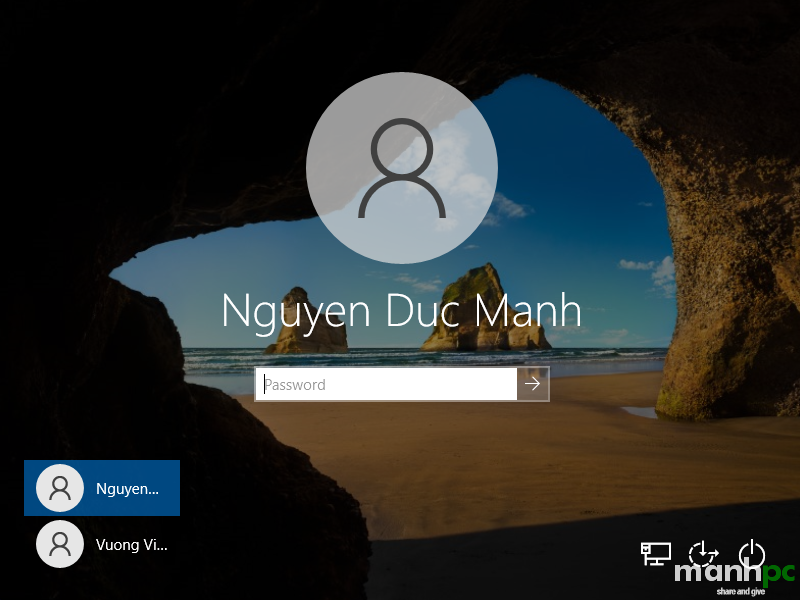

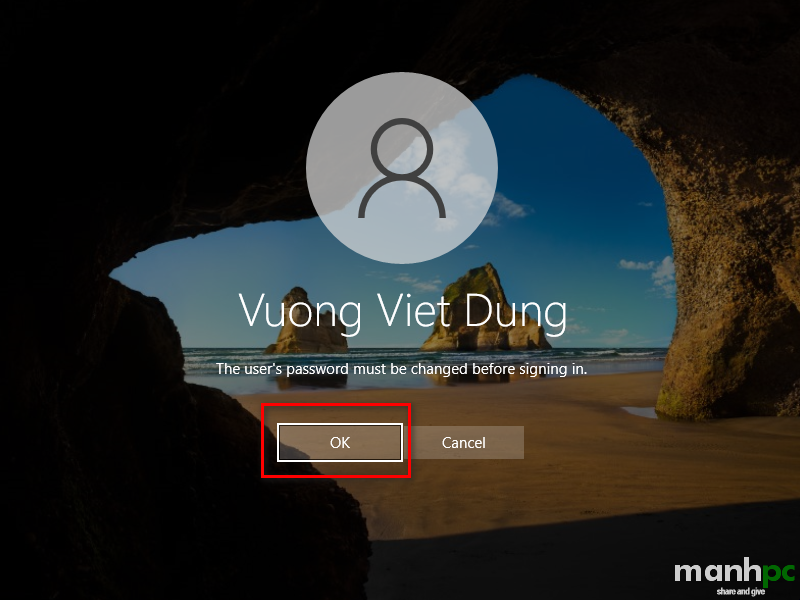
Trong hình đầu tiên thì trong file unattend.xml đã có thông tin mật khẩu của user manhnd rồi cho nên đến bước này chỉ cần đăng nhập là xong. Với hình thứ hai là tài khoản dungvv chưa được đặt mật khẩu trong file unattend.xml vì vậy hệ thống sẽ bắt phải đặt mật khẩu lần đầu tiên. Nhấn OK để đặt mật khẩu.
Kết luận
Như vậy tôi đã chia sẽ với các bạn các thông tin về oobesystem pass, cùng với đó là hai file .xml mẫu mà tôi đã thực tế triển khai. Bạn có thể copy các lệnh bên trên tại đây.Trong quá trình thao tác thực tế nếu còn vướng mắc điều gì bạn hãy để lại bình luận phía bên dưới nhé. Cảm ơn các bạn đã đọc bài!
Chúc bạn thành công!
(manhpc)


